I was simply delighted to find out that *WinModelines* didn't had any affect on this card.
But I didn't gave up and did some more research and found a tool called "AMD Custom Timing Tool".
It originally only worked on the FirePro cards but the executable that could be found on the net (back then) is a hacked one where the check was reversed by patching a JNZ to a JZ.
So it errors out on FirePro drivers instead with "No Workstation Adapter found!".
(on 0x324A, the original was very likely a 0x0F85 JNZ rel32 and was simply patched to 0x0F84 JZ rel32)
Now using that tool simply sucks as it has stupid limitations like it rejects anything smaller than 640x480.
And even if it didn't sucked that hard, it would still be absolutely annoying to translate each Modeline from my list to its individual values and input these in each textfield.
However, the tool helped me by injecting a nonstandard resolution that was actually displayed correctly.
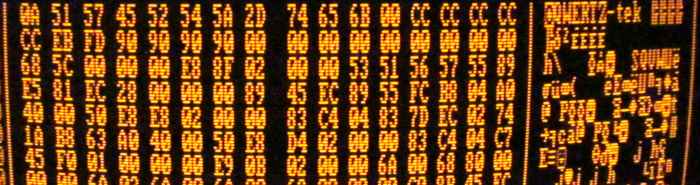
From there it was a matter of reverse engineering the data format in the registry and trying stuff out by changing the data and observing the changes.
Also some information about these "ModeTimingOverrides" was floating around the net which gave me some clues.
It's very likely that the format that my drivers use is different from other new ones.
In that case the source code could be changed.
(Seems like a extra DWORD before HTotal)
I'm using a Sapphire branded card with a highly hacked FirePro driver of which I simply didn't kept track of all changes and stuff I've tried to make this and that work.
But I recall that I've simply forged FirePro 8.911.3.4 for Cayman based GPUs to install, then replaced ati2mtag.sys from 12.1 driver intended for the HD6970 to make it work correctly*.
Also I've hacked this file later to trick the Catalyst Control Center into showing OpenGL quad buffer settings (for stereoscopy) to enable line interleaved mode which actually works.
I just followed some online guides for that but don't know anymore which ones and for some reason the settings disappeared again but the option is still enabled somehow.
*(the output looked like 3-bit RGB, it was all 0 on all RGB channels unless the value was 255, then it showed through)
Of course this insane effort was worth it.
Super fast rendering of (old) 3D games and real GPU accelerated OpenCL support which I'll daily use to watch video files with *SVP* interpolated to the screen refreshrate.
Byte offset in Hex : DWord offset in decimal = Description
00:0=Reported Width
04:1=Reported Height
08:2=Reported Refreshrate
0C:3=value 15 (0x0F) (a value of 0xFF crashes the driver)
10:4=value 2 *
14:5=Mark as Interlaced (1=enabled, this will half the reported refreshrate)
18:6=HTotal
1C:7=value 0, scale X (increase H Display by 2x of this)
20:8=H Display
24:9=value 0, shift image horizontally
(moves image left)
28:10=H Frontporch
2C:11=H Sync
30:12=V Total
34:13=value 0, scale Y (increase Y Display by 2x of this, DO NOT SET THIS TOO HIGH or else the driver crashes)
38:14=V Display
3C:15=value 0, shift image vertically (moves image up)
40:16=V Frontporch
44:17=V Sync
48:18=Pixelclock in Khz (will refuse to load if too high)
4C:19=value 0 *
50:20=value 0 *
54:21=value 0 *
58:22=value 0 *
5C:23=value 2 *
60:24=value 1 [setting to 2 or 3 enabled green mono mode aka no red+blue channel, 0x202;0x102;0x82 disables blue]
64:25=Flags (1=Interlacing, 64=HSync+, 128=VSync+)
(2,4=nothing? 8,16,32=refuses to load [if forced it will scale up to the last mode])
[1024 is added by the driver, for some reason, clearing this has no effect, 256=hide from modelist]
*had no effect at all
Everything in [square brackets] was only effective if the data was changed in system memory after boot with *RW Everything*. (searching and finding that data was a random gamble)
It is already known that many drivers enforce a limit of 400Mhz for VGA (and 330Mhz for DisplayPort).
But this is about something more vile and stupider than that.
If interlacing is enabled then another and much lower pixel clock limit is enforced.
And I spent way to many hours trying to find the code behind that, but I still can't make any sense of it as if it's somehow defined in the Video BIOS.
A clock up to 245,454 Mhz works fine for interlaced modes, however 245,455 Mhz (and higher) don't.
There must be some really dumb PLL programming/algorithm going on.
It simply makes no sense how a much older Radeon 9250 has no trouble with higher pixel clocks.
What is even more funnier is that on progressive modes it's the same thing but twice the frequency.
A clock of 490,909 Mhz works and is rock solid but 490,910 Mhz doesn't show up at all.
Changing the data in the system memory after boot also doesn't work, the driver simply skips applying the new resolution.
If you think that all that is very stupid then hold on your chairs, the next one is even dumber than that.
All interlaced pixel clocks of 163,636 Mhz and lower resulted into a blurry picture. (deflicker filter)
Luckily I was able to fix that by changing some pointer into the "scaler registers" to address the unused HDMI
output instead. (inside ati2mtag.sys with the help of Ghidra).
This got rid of the issue and now switching from interlaced 1600x1200@160hz to non-interlaced 800x600@160hz happens much quicker without my monitor blanking out.
But now a new issue is introduced: resuming from standby causes the doublescan mode to be engaged. However I've solved this with a AutoHotkey script that after resume and login opens a new command prompt and sets it to fullscreen mode via sending Alt+Enter (this gets rid of doublescan) and types in EXIT followed by sending a Enter keypress to close it.
Also the DisplayPort output was not affected by that, even better yet it was able to go very, very low.
I've stopped experimenting after seeing a pixel clock of ~1,25Mhz on my 15Khz TV. (64x240@60hz)
As comparison the *popular AY-3-8500 Pong chip* from 1975 runs on a 2Mhz pixel clock.
I'm using a StarTech MDP2VGA for this output but I'm sure most generic adapters should work fine too.
I highly recommend of setting up a batch file.
This is what I use on my system:
timegen "my modelist vga.txt" HKEY_LOCAL_MACHINE\........\EDID_0_0 ModeTimingOverrides_VGA_Conn12546
timegen "my modelist 15khz.txt" HKEY_LOCAL_MACHINE\........\EDID_0_0 ModeTimingOverrides_DP_Conn12819
pause
The first argument is the input file containing the modelines in the EXACT same format as WinModelines, every line that doesn't start with the word "Modeline" is ignored. (Comparison is case-insensitive)
Then the complete path to the video driver registry plus the path where the ModeTimingOverrides are which is followed by the name of the REG_BINARY entry ModeTimingOverrides_*_Conn????? itself.
That name is dependent of the connector itself and may vary by card or driver.
The program will print out a list of all parsed modes, which look like this:
>640x400_70hz (640x400 | -31.47kHz: +70.09Hz 800x 449 total)
>640x400_140hz (640x400 | -60.76kHz:-140.00Hz 856x 434 total)
>800x600_60hz (800x600 | +37.95kHz: +60.44Hz 1056x 628 total)
>800x600_85hz (800x600 | +53.66kHz: +85.05Hz 1048x 631 total)
>800x600_120hz (800x600 | -77.16kHz:-120.00Hz 1080x 643 total)
>800x600_160hz (800x600 |-105.44kHz:-160.00Hz 1096x 659 total)
>1280x800_140hz (1280x800 | -60.76kHz:-140.16Hz 1712x 867 total interlaced)
>1280x800_70hz (1280x800 | -31.47kHz: +70.01Hz 1600x 899 total interlaced)
>1600x1200_60hz (1600x1200| -74.52kHz: -60.00Hz 2160x1242 total)
>1600x1200_75hz (1600x1200| -93.97kHz: -75.00Hz 2184x1253 total)
>1600x1200_85hz (1600x1200|-107.10kHz: -85.00Hz 2200x1260 total)
>1600x1200_120hz (1600x1200| -77.16kHz:-119.90Hz 2160x1287 total interlaced)
>320x240_60hz (320x240 | -15.71kHz: -59.95Hz 418x 262 total)
>640x480_61hz (640x480 | -15.75kHz: -60.00Hz 779x 525 total interlaced)
Done.
The first is the reported resolution and refreshrate which the driver will forward unchanged to Windows.
This allows for fake refreshrate to workaround idiotic (DirectX) limitations and the fake resolution could enable something dumb called "Supersampling" (letting the GPU downscale from a higher resolution).
Also fake refreshrates are useful for enabling an alternative mode, in the case of "640x480@61hz" which is actually 15khz interlaced prevents it from overriding the default 31khz mode and allowing for a choice.
Followed next are the active resolution, calculated frequencies prefixed with the sync polarity and lastly the total size of the video signal (also blanking and sync added to the active video size).
Errors will be reported in a easy to understand way telling which line number caused it.
The end result will be a .REG file named after the input file which you can now apply then restart Windows.
Download the ZIP here. (Win32)